Focus groups
A Merlin focus group is a simulated conversation where you can chat to individual participants in small groups, based on real personas from your dataset, and discuss a topic, question or image you provide. Each participant maintains a consistent personality drawn from their seed data, creating realistic group dynamics.
Merlin selects personas from your audience, generates detailed participant profiles based on their seed data, and uses Large Language Models to simulate how each would respond in a group discussion. The AI maintains each participant’s unique perspective throughout the conversation, creating authentic dialogue that reflects the real make-up of your audience.
Why use focus groups?
Use focus groups when you need to:
- Understand reasoning behind survey responses
- Test reactions to concepts or messaging in depth
- Find objections or concerns you hadn’t considered
- Generate hypotheses for further testing
- Explore complex topics that can’t be captured in multiple choice
Focus groups complement your quantitative work by adding nuance, context, and human depth.
Two ways to run one
Merlin offers two conversation formats: you moderate the session yourself, or an AI moderator runs it for you.
Clicking Focus Group in the toolbar at the bottom of a study takes you to Panel setup, which is the moderate-it-yourself route. For the AI-moderated version, click Looking for an AI moderated panel? (Debate) in the top right of that dialog.
1. You moderate the session
Participants respond to your questions and discussion points together, building on each other’s ideas. Similar to a traditional facilitated focus group.
On Panel setup, choose the audience you want to talk to, then click Recruit panel.
Merlin selects up to five members of that audience and shows you a one-line profile of each — age, location, employment, household, and anything else that shapes how they'll answer. Each one is labelled P1 to P5, and those labels follow them through the whole session.
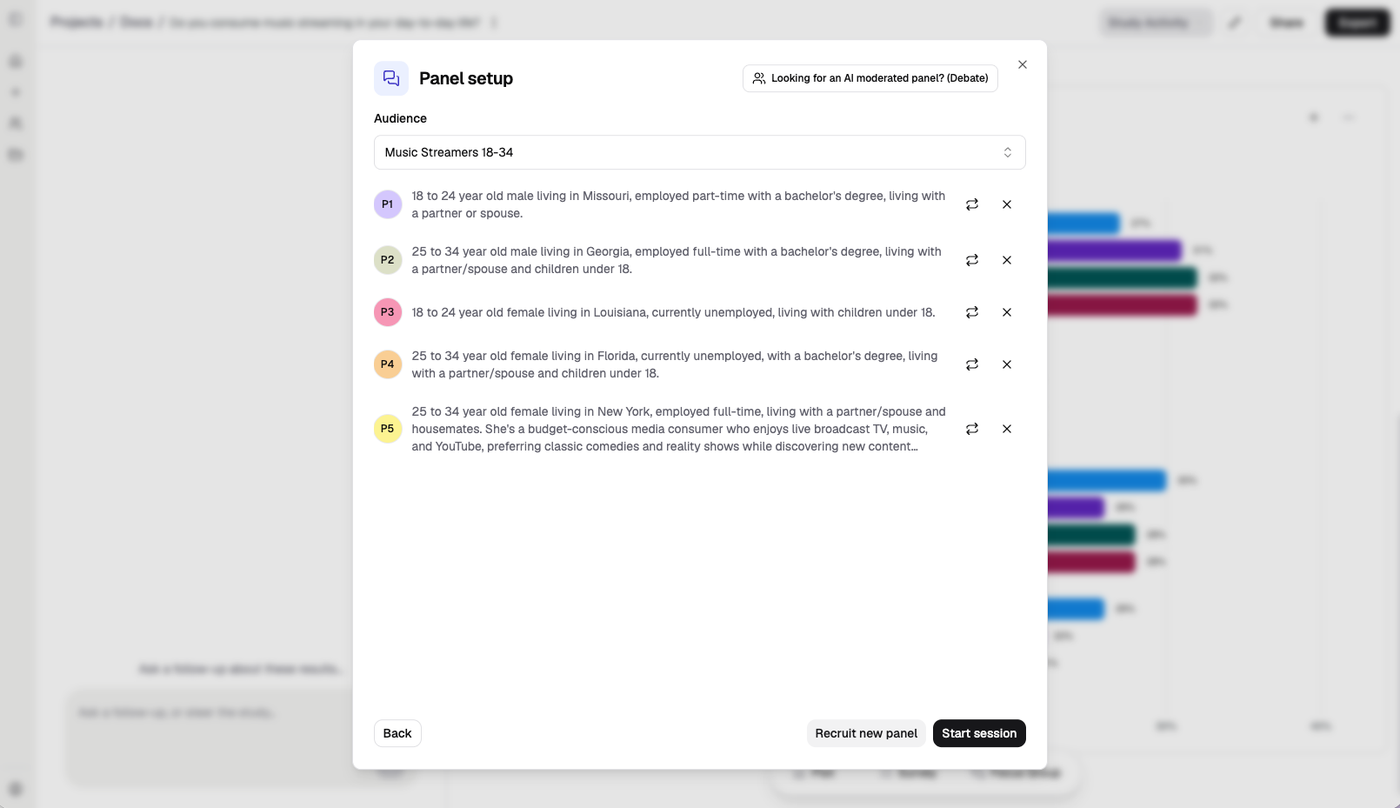
Five participants, each with the profile that will shape their answers. Swap any of them before you start.
If you're not happy with the selection, you can change it before you start:
- ⟳ beside a participant swaps that one person for someone else in the audience
- × removes them
- Recruit new panel resamples the whole group
Click Start session when you're happy with the panel, and you'll enter a chat interface where you can start your discussion.
Above the chat input, an Ask selector lets you put a question to Everyone or to a single participant — useful for following up on one answer without derailing the group.
You can also show the personas images to get their qualitative perspective on them.
The session has three tabs. Discussion is the conversation itself, with Copy responses to lift the transcript out. Summary updates as you go, extracting the key themes. Panel participants holds the full profiles, which you can also see by hovering the P avatar next to any answer.
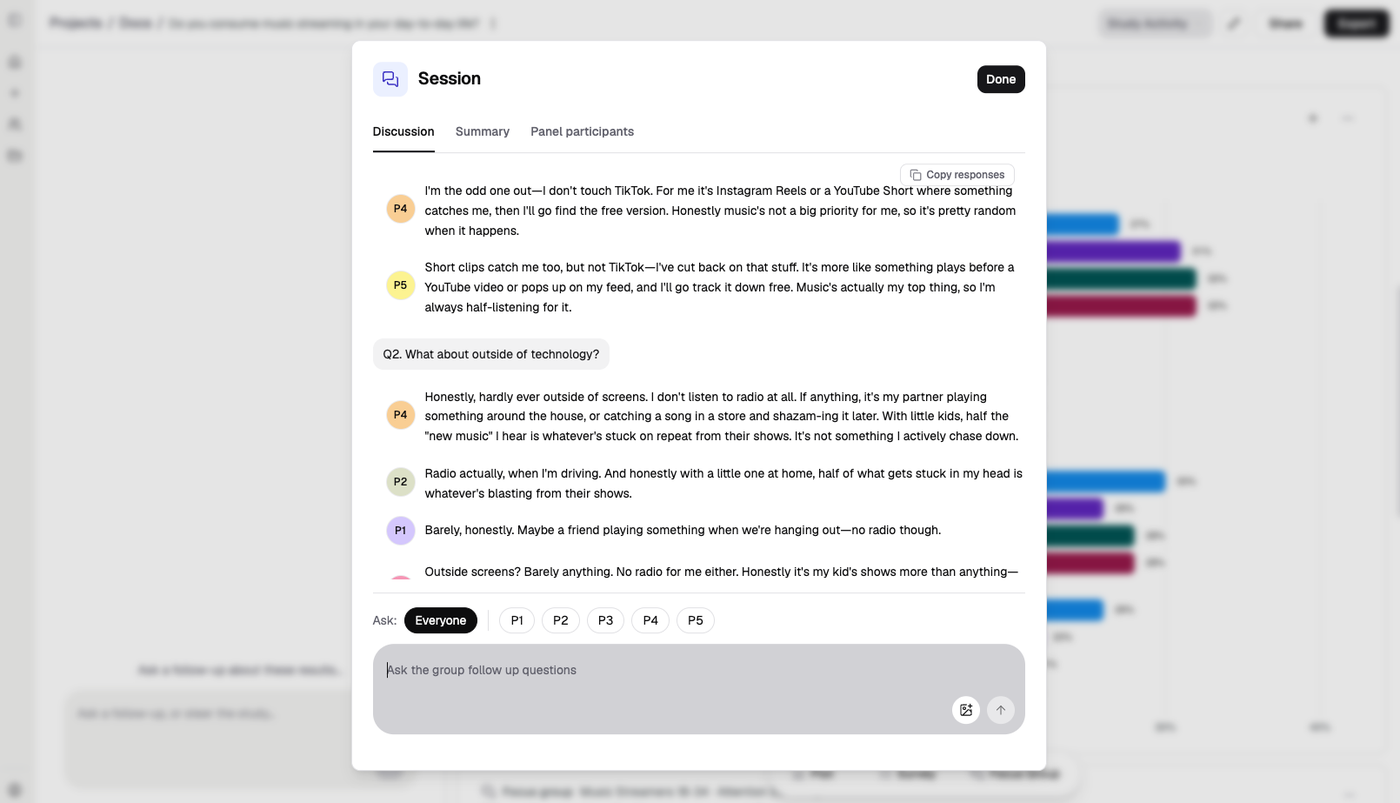
A session in progress. Participants answer in their own voice and disagree with each other — P4 doesn't touch TikTok, P5 does but has cut back.
When you’re finished, click Done in the top right corner. A summary of the discussion will appear on a card in your study, and you can continue the discussion at any time by clicking Continue Discussion on the card.
2. We moderate it for you
In this mode, an AI moderator asks the questions and the results are summarised for you.
The AI moderator aims to push the personas to explore the full range of opinions. The goal is to find all the different views personas hold on a topic. We call this a Debate.
Participants take opposing positions and defend their viewpoints, which creates a more argumentative, persuasion-focused dialogue.
On the Debate setup panel, select the audience you want to participate, enter a topic or question for them to discuss, and optionally add any images you want to present for discussion.
Click submit, and the Debate will run before a summary is produced and presented on a card in the study.
Next
Explore related features:
- Audiences — create and refine audiences
- Plots — chart a question already in your data
- Surveys — ask questions not in your data
- How we know it works — how focus group and debate output is evaluated
- Presenting a result — why synthetic comments must never be quoted as verbatims